Formula: A Material Design Agency Template for Modern Web Projects
When you're building a website for a consulting firm, a creative agency, or a corporate client, the template you choose sets the tone for everything that follows. You need something that looks polished, feels professional, and doesn't require you to fight with the code for hours just to get a section aligned properly. That's where a well-built Bootstrap template can genuinely save your project—and your sanity.
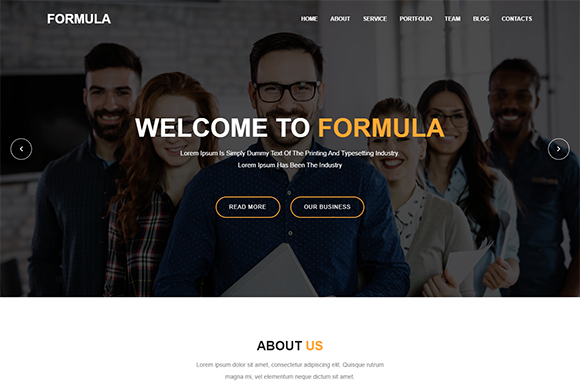
Formula is a Bootstrap creative corporate HTML5 template built on Material Design principles. It's designed for agencies, consultancies, and businesses that want a clean, contemporary online presence without starting from a blank canvas. The template ships with multiple layout styles, smooth CSS and jQuery animations, and a visual language that feels current without being trendy in a way that'll look dated next year.
Why Material Design Works for Corporate and Agency Sites
Material Design isn't just a Google buzzword. At its core, it's a system built around depth, motion, and meaningful visual hierarchy. Buttons look clickable. Cards feel like physical objects layered on a surface. Transitions guide your eye rather than distracting it. For corporate websites—where trust and clarity matter more than flashy effects—this approach hits a sweet spot between visual interest and professional restraint.
Formula takes those principles and applies them to a Bootstrap framework, which means you're working with a responsive grid system that's already battle-tested across millions of websites. The layout adapts cleanly to different screen sizes, so your consulting firm's site looks just as sharp on a phone as it does on a desktop monitor. That kind of responsive behavior isn't optional anymore—it's the baseline expectation from any serious audience.
What's Actually Inside the Template
Let's talk specifics, because the value of any design asset comes down to what you can actually do with it. Formula includes a full set of HTML files, CSS files, JavaScript files, font files, and PHP files for a working contact form. That last part matters more than people realize—having a contact form that actually sends emails without needing a developer to wire it up separately is a genuine time-saver.
The template uses Font Awesome icons and Google Fonts, both of which are free and widely supported. The HTML markup is valid and fully commented, so if you hand it off to another developer—or come back to it yourself six months later—the code is readable. There's detailed documentation included, which is one of those things you don't appreciate until you're stuck trying to figure out how a particular animation is triggered.
Pixel perfection is baked into the design, meaning the spacing, alignment, and proportions have been carefully considered rather than eyeballed. For anyone who's ever spent an afternoon nudging elements around trying to get them to "feel right," that kind of built-in precision is worth its weight in saved hours.
Practical Applications Across Different Industries
A template like this isn't limited to one type of business. Here's where it tends to work well:
- Consulting firms that need to project authority and trustworthiness through clean layouts and restrained typography.
- Creative agencies showcasing portfolios where the work itself should be the focal point, not the website's design competing for attention.
- Startups and small businesses that need a professional web presence quickly, without a six-month custom development timeline.
- Corporate websites where multiple departments need content sections—services, team pages, case studies, blogs—all organized in a coherent structure.
- Freelancers and solo practitioners who want to look established and credible from day one.
The multiple style variations included in Formula mean you're not locked into a single look. You can adjust the visual personality of the site depending on whether your client is a law firm, a tech startup, or a design studio. That flexibility is what separates a useful template from one that forces you into a rigid mold.
Animations That Add Value Without Distracting
One area where many templates go wrong is animation. Too much movement and the site feels like a carnival. Too little and it feels static and lifeless. Formula includes CSS and jQuery animations that are subtle enough to feel intentional—smooth fade-ins as sections scroll into view, hover effects that give interactive elements a tactile quality, transitions that make page navigation feel fluid rather than abrupt.
These kinds of micro-interactions matter for audience engagement. They signal that someone cared about the details, which translates into perceived professionalism. For a consulting or corporate site, that perception directly affects whether a visitor fills out the contact form or bounces to a competitor.
Getting the Most Out of the Template
A template is a starting point, not a finished product. To make Formula work for your specific project, keep a few things in mind:
Customize the content thoughtfully. Replace placeholder text with copy that speaks to your actual audience. Generic lorem ipsum in a live site undermines even the best design. Write headlines that address your visitors' problems, not just your company's features.
Choose your images carefully. The demo images aren't included in the download, which is standard for templates like this. Use high-quality photos that reflect your brand's personality—whether that's corporate and polished or creative and energetic. Stock photos work fine as long as they don't look obviously staged.
Pay attention to color and typography choices. Even though the template comes with a defined style, you can adjust colors and fonts to match your brand identity. If your brand uses specific hex codes, swap them in. If you have a preferred typeface from your brand guidelines, integrate it. The template's clean CSS structure makes these changes straightforward.
Test across devices and browsers. The responsive design handles most situations well, but always check your customized version on actual phones and tablets, not just in a browser's resize tool. Pay special attention to the contact form—test that it actually sends messages to your inbox before going live.
A Solid Foundation for Serious Projects
What makes a template genuinely useful isn't just its visual design—it's how much friction it removes from the process of building something real. Formula gives you a responsive, well-structured, visually coherent starting point that works for corporate consulting sites, creative agency portfolios, and everything in between. The Material Design foundation keeps things looking modern and professional. The Bootstrap framework keeps things functional and maintainable. And the included features—the working contact form, the commented code, the detailed documentation—mean you spend less time troubleshooting and more time actually building the site your business needs.
If you're a designer looking for a reliable base to customize for clients, or a business owner who needs a professional web presence without the overhead of a fully custom build, it's worth exploring what this template offers. The combination of clean design, practical features, and thoughtful structure makes it a tool that earns its place in your project toolkit.