Rinosa: Crafting Polished, Professional Presentations
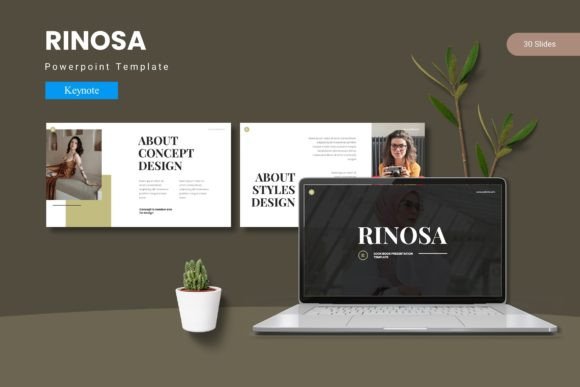
Let's be honest, most presentations are forgettable. We've all sat through slideshows cluttered with mismatched fonts, awkwardly cropped images, and a chaotic mix of colors that do more to distract than inform. The core ideas might be brilliant, but the delivery falls flat, undermining the speaker's credibility. This is where a thoughtful approach to design changes everything. A tool like the Rinosa - Google Slide Template isn't just about making slides look "nice"; it's about providing a structured, professional framework that lets your content shine, ensuring your message is received with the clarity and impact it deserves.
Beyond Aesthetics: The Anatomy of an Effective Template
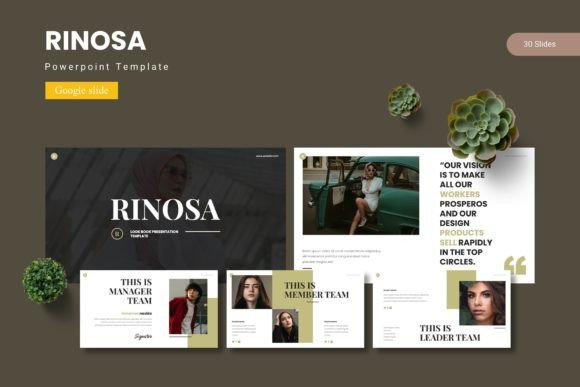
What separates a truly useful presentation template from a simple collection of pretty slides? It comes down to versatility, consistency, and user-centric design. The Rinosa template understands that a single presentation might need to serve multiple purposes—from a data-heavy quarterly review to a visually driven brand story. Its foundation of over 150 slides, built on a master slide system, ensures that every element you change propagates correctly throughout the entire deck. This means no more wasting time fixing a header on slide 27 because you changed it on slide 3. The pixel-perfect illustrations and handcrafted infographics are designed to be resized and edited without losing quality, a crucial feature when you're adapting visuals for a specific data set or a new brand color scheme.
The inclusion of five distinct color schemes is a practical gift for anyone juggling multiple projects or clients. Instead of starting from scratch, you can apply a pre-harmonized palette that sets a professional tone instantly. The drag-and-drop picture placeholders streamline the process of incorporating your own photography or stock images, making the layout process intuitive rather than technical. For designers and marketers, this means less time wrestling with software and more time refining the narrative and visual strategy.
Practical Applications Across Your Professional Toolkit
Think of a presentation template not as a standalone tool, but as a central hub for your visual communication. The clean, modern typography and structured layouts within Rinosa make it a versatile asset far beyond the boardroom. Consider how these slides could become the foundation for your next brand identity proposal, where you lay out logo concepts, color palettes, and typography guidelines. The section break slides are perfect for delineating different facets of a brand story.
For content creators and bloggers, this template can be repurposed to design visually cohesive social media graphics or web design mockups. Export a slide as an image to create a consistent Instagram carousel or a Pinterest pin that aligns with your blog's aesthetic. Small business owners can leverage it for packaging design presentations, showcasing product lines with the gallery and portfolio slides, or for creating print materials like posters and invitations with a professional, unified look. The ability to maintain visual consistency across a product launch—from the investor pitch to the customer-facing social media assets—is invaluable for building brand recognition.
Integrating Design Assets for Cohesive Branding
A powerful presentation often works in concert with other design elements. While Rinosa provides the structural and typographic backbone, pairing it with complementary design assets can elevate your project further. Imagine using a premium display font from your brand's style guide for slide titles, while relying on the template's clean sans-serif for body text to ensure readability. This practice of font pairing—mixing a bold, expressive typeface with a more neutral one—is a hallmark of sophisticated editorial design.
The template's neutral yet modern aesthetic makes it an excellent canvas. It won't compete with your core brand identity elements but will support them. When preparing a presentation for a client in the fashion industry, you might incorporate textures and high-fashion imagery. For a tech startup, the clean lines and infographic slides become the stars. This adaptability is what makes it a valuable piece in any creative professional's toolkit, saving time while upholding a high standard of professional presentation.
Making It Your Own: Tips for Customization
To get the most out of any template, a bit of strategic customization goes a long way. Start by aligning the color schemes with your brand's primary and secondary colors. This small change creates immediate ownership. Next, review the included font styles. While the template comes with its own typographic choices, don't hesitate to swap them for your brand's designated fonts—just be mindful of maintaining the hierarchy and spacing the original designer established.
Always test your final presentation in the environment where it will be viewed. Check that text remains legible when projected and that colors haven't become distorted. The goal is to enhance audience engagement, not create barriers. Use the portfolio slides to tell a visual story, and the data-driven infographics to simplify complex information. Remember, the most effective slides are often the simplest, with ample white space and a clear focal point.
Ultimately, a resource like the Rinosa - Google Slide Template serves as a launchpad. It handles the heavy lifting of layout, alignment, and visual harmony, freeing you to focus on what truly matters: crafting a compelling message, telling a resonant story, and connecting with your audience. In a world saturated with information, that thoughtful, polished presentation can be the difference between being heard and being overlooked.