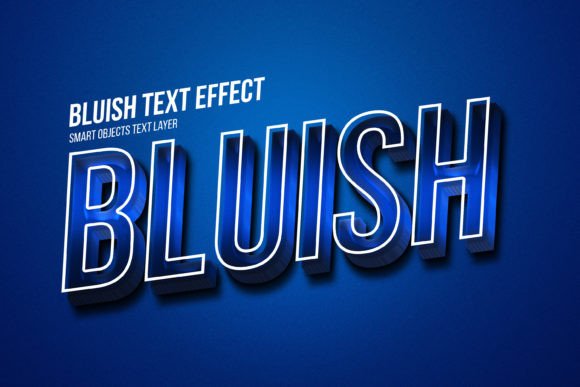
Instant Design Upgrade: The Bluish PSD Text Style Effect
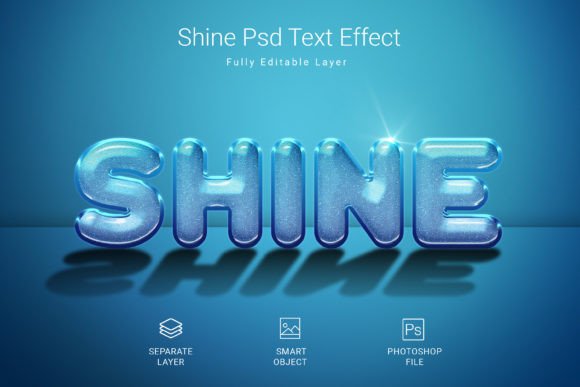
Let’s be honest: staring at a blank canvas trying to figure out how to make your text stand out is exhausting. You know your design needs "pop," but manually creating bevels, shadows, and lighting effects in Photoshop is a rabbit hole of wasted time. This is where smart design assets come into play. The Bluish PSD Text Style Effect Mockup is one of those "secret weapons" that designers and business owners keep in their toolkit. It provides a rapid, high-fidelity way to apply a cool, metallic, or ice-inspired aesthetic to your typography, logos, or vector shapes. Instead of spending an hour tweaking layer styles, you simply paste your work into a Smart Object, hit save, and instantly see your flat text transformed into a professional-grade render.
Why the "Cool Factor" Matters in Branding
Color psychology isn't just marketing fluff; it’s a visual reality. Blue is universally associated with trust, stability, intelligence, and calm. When you combine that with a modern text effect, you create an immediate emotional connection with the viewer. The Bluish Psd Text Style Effect Mockup isn't just about making text look shiny; it’s about conveying a specific mood. Whether you are going for a futuristic tech vibe, a winter holiday aesthetic, or a clean, corporate look, this particular color grade offers incredible versatility.
For entrepreneurs and content creators, visual consistency is the bedrock of brand recognition. If your brand identity leans towards cool tones—think tech startups, health and wellness brands, or digital agencies—using this specific mockup style across your materials creates a cohesive look. It helps your audience recognize you instantly on a crowded social media feed. It’s a subtle but powerful way to say, "We are professional, and we care about the details."
Practical Applications: Where This Asset Shines
You might be wondering where exactly you can use a premium font style effect like this. The beauty of the file structure (specifically the 3000x2000 pixel dimension and 300 DPI resolution) is that it is built for both digital and print. You aren't restricted to just one medium.
Here are some real-world scenarios where this design asset becomes invaluable:
- Social Media Dominance: Instagram stories, YouTube thumbnails, and Facebook ads need to grab attention in milliseconds. A creative font with a bluish 3D effect stops the scroll.
- Logo Design & Brand Identity: While a final logo should usually be vector-based, using this effect for presentation slides or watermarking your photos adds a layer of depth and professionalism.
- Product Packaging: If you are designing for a product that fits a "cool" or "tech" niche, this effect works beautifully for box art mockups or label presentations.
- Editorial Design: Magazine covers or blog headers often need dramatic typography. This display font style effect makes headlines scream for attention.
- Event Invitations: Planning a winter gala, a tech conference, or a modern wedding? This style sets the tone immediately.
- Merchandise: T-shirts, mugs, and posters often rely on text-based art. This effect gives that art a high-quality, printed look before you even go to production.
Streamlining Your Workflow with Smart Objects
One of the biggest hurdles in design is the technical barrier. Not everyone has the time to master complex Photoshop layer masking. The genius of the Bluish Psd Text Style Effect Mockup lies in its simplicity. It utilizes Smart Objects, which are essentially containers within the file. You don't need to understand the intricate bevel and emboss settings used to create the look; you just need to know how to double-click, paste your text or logo, and close the window.
This is particularly useful for small business owners who might be wearing the "designer hat" alongside ten other roles. You get the result of a high-end graphic designer without the billable hours. Plus, because the file is Fully Editable, you aren't locked into one look. You can tweak the background, adjust the lighting, or even modify the color balance if you want to shift from a cool blue to a warm copper, though the default blue is tuned for maximum impact.
Typography Pairing and Readability
While this asset is a text style, the typeface you choose to apply it to matters immensely. A heavy, blocky sans serif font will generally take this effect better than a delicate, thin script. The depth and shadows need surface area to "live" on. If the strokes of your letters are too thin, the 3D effect might look muddy or disappear entirely.
When using this for marketing assets or web design, consider readability. A highly stylized 3D text is fantastic for headers and logos, but it should rarely be used for body copy. Your main paragraphs need to be clean and legible—stick to a standard serif font or a simple sans serif font for the small text, and let the Bluish PSD style handle the big, bold statements.
Try pairing the styled text with a clean, modern geometric sans-serif for the sub-headers. This creates a hierarchy that guides the viewer's eye. The effect draws them in, and the clean text delivers the message. It’s a balance of flair and function.
Technical Specs That Actually Matter
When looking at design assets, specs often look like a random string of numbers. But for this mockup, every detail serves a purpose. The 3000x2000 pixel size ensures you have plenty of resolution. This means you can crop into the image for close-up shots without losing quality, or print it on large format posters.
The 300 DPI Resolution is the industry standard for print. If you are creating physical items—flyers, business cards, or merchandise tags—this resolution ensures the text looks crisp and not pixelated. The RGB color mode is optimized for screens, which is perfect for the majority of modern use cases, from website banners to digital ads.
Furthermore, the inclusion of a Free Font Used is a massive bonus. Often, you download a cool effect only to find out you need to purchase a $50 font family to make it look right. Having the font included means you can get the exact look shown in the preview immediately.
Elevating Your Visual Communication
Ultimately, design is about communication. You are trying to convey a message, sell a product, or share an idea. The visual wrapper you put around that message influences how it is received. A flat, uninspired text block might get ignored. A dynamic, well-rendered text effect creates curiosity and perceived value.
Using a resource like the Bluish Psd Text Style Effect Mockup is about working smarter. It allows you to maintain a high standard of visual consistency across different platforms. Whether you are a content creator making thumbnails or a brand strategist pitching a new visual direction, having a library of reliable, high-quality effects speeds up your process and improves your output.
Don't underestimate the power of the "details." It is often the texture, the lighting, and the depth of your typography that separates amateur work from professional art. This asset bridges that gap, giving you access to complex visual techniques with just a few clicks.
⭐ 𝙸𝚏 𝚈𝚘𝚞 𝙻𝚒𝚔𝚎 𝙸𝚝, 𝙿𝚕𝚎𝚊𝚜𝚎 𝙳𝚘 𝙽𝚘𝚝 𝙵𝚘𝚛𝚐𝚎𝚝 𝚃𝚘 𝐑𝐚𝐭𝐞 𝐈𝐭 𝟓 𝐒𝐭𝐚𝐫𝐬.